| Chapter 4. Determining COM Port | ||
|---|---|---|
 | ||
| Chapter 4. Determining COM Port | ||
|---|---|---|
| | ||
The board uses a USB serial interface to communicate with the PC. When the USB port of the board is connected to the PC, MS Windows assigns a COM port to the board. To determine the assigned COM port, follow the instructions given below.
Step 1. Right click on the My Computer icon, to get the drop down
menu. Select the Properties from the menu.
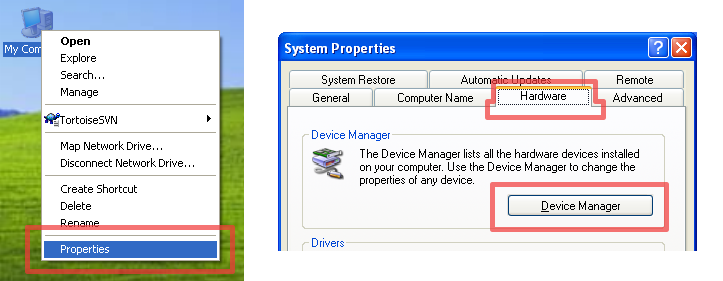
Step 2. In the System Properties window that appears, select the Hardware
tab. In the tab, click on the Device Manager button.
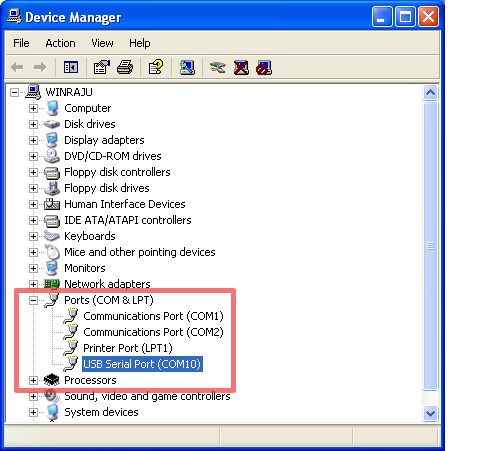
Step 3. In the Device Manager window, a tree of devices present in the
system is shown. Expand the Ports node in the device tree. Look for
an entry called USB Serial Port. The assigned COM port is specified
in parenthesis, as shown in the figure below. If this does not appear
make sure you have installed the driver correctly as mentioned in
installation manual.
| | ||
| Chapter 3. GNU/Linux |  |